Saturday, June 4, 2011
Blackberry Blogger Template - Mobile,tech niche template
Posted by prem | Saturday, June 4, 2011 | Category:
|
0
comments
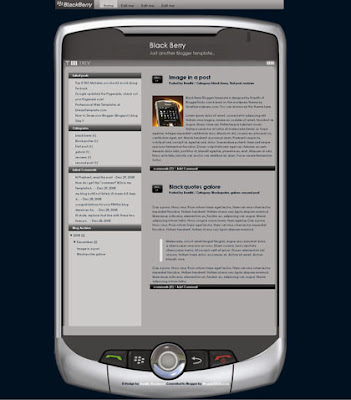
Here again guys, I'm back with another professional Blogger template "Blackberry". The template is two columns and very well suits for mobile,tech related sites. This was originally a wordpress theme by QualityWordpress.com. I converted it into Blogger xml format for you guys!
Take a look at the screenshot:
Template Installation Instructions:
1.First, download and install the template following these basic installation steps.
2.Now, go to Layout » Edit html and scroll down the template and find these lines and edit the links with your desired ones.

3. Now, go to Settings » Formatting and change the Timestamp format like this one

and Save the Changes... that's it!
Take a look at the screenshot:

Template Installation Instructions:
1.First, download and install the template following these basic installation steps.
2.Now, go to Layout » Edit html and scroll down the template and find these lines and edit the links with your desired ones.

3. Now, go to Settings » Formatting and change the Timestamp format like this one

and Save the Changes... that's it!


Itunes Music is now DRM-Free With iPhone 3G Music Downloads
Posted by prem | | Category:
|
0
comments
Today, at Macworld, Apple announced that iTunes songs are now DRM (Digital Rights Management) free with songs costing $0.99 cents, $0.69 cents and $1.29. The pricing will also be offered in three tiers now, instead of just one.
Out of 10 million songs, 80 per cent are available on the music store from major music labels including Sony BMG, Virgin, Warner music, American Recording without DRM in the store, while the remaining two million songs would be made available by this spring.
DRM (Digital Rights Management) technology tries to prevent piracy by placing some restrictions on how the customers may use the music they purchase from their store. Apple's strong FairPlay DRM technology requires a customer to authorize his/her PC to play purchased tracks and they allow only a few computers to be authorized.
You can easily upgrade your existing DRMed tracks to DRM-free versions at $0.30 per song while the music videos can be upgraded at $0.60 each. The songs would be high in quality with Apple's DRM-free 256kbps AAC.
Not only that folks, Apple also announced that, from today, iTunes music store would also be available over the mobile phone networks via 3G, as well as over Wi-Fi. There would be no additional fee and all DRM-free at 256kbps AAC.
Out of 10 million songs, 80 per cent are available on the music store from major music labels including Sony BMG, Virgin, Warner music, American Recording without DRM in the store, while the remaining two million songs would be made available by this spring.
DRM (Digital Rights Management) technology tries to prevent piracy by placing some restrictions on how the customers may use the music they purchase from their store. Apple's strong FairPlay DRM technology requires a customer to authorize his/her PC to play purchased tracks and they allow only a few computers to be authorized.
You can easily upgrade your existing DRMed tracks to DRM-free versions at $0.30 per song while the music videos can be upgraded at $0.60 each. The songs would be high in quality with Apple's DRM-free 256kbps AAC.
Not only that folks, Apple also announced that, from today, iTunes music store would also be available over the mobile phone networks via 3G, as well as over Wi-Fi. There would be no additional fee and all DRM-free at 256kbps AAC.
One way backlinks are very critical to any website success. The more one way backlinks pointing to your site, the more your Google Pagerank and the more amount of traffic you will get. This should also increase your sales,etc.
But the thing is.. getting the right and quality one way backlinks from high pagerank sites is not an easy task, and in this article, we'll find out some of the best ways to get free one way backlinks:
1. Try to write as much quality content as you can... that will encourage the readers to link to your site. The more useful, informative content you post, the more likely people are to link it. But, this method can take a while to really pay off because like all the new websites, you don't get much traffic.
2. Write quality articles and submit them to top article directories like ezinearticles and goarticles. The advantage in this is, you'll not only get a backlink from high pagerank directories, but also you'll find that your articles are used on other people's sites with a backlink to your site.
3. Participate in forums,discussion boards that are related to your website's niche and add a link to your site in the signature. Make sure that you write quality posts, don't spam. This will also help you get some decent traffic to your site.
4. There is absolutely nothing wrong to get a backlink from a related blog post you decide to comment on. This is one of the effective way of one way link building especially if you comment often on blogs. Comment on blogs related to your niche with a link back to your site as your signature.. and Again, make sure you never spam.
5. Submit your site link to major, well known web directories. Getting listed in directories related to your site not only bring you tons of targetted traffic, but will also improve your search engine rankings. Some of the popular directories to get listed in are DMOZ directory and Yahoo directory. You can submit your link to both paid and free directories and they worth your time
But the thing is.. getting the right and quality one way backlinks from high pagerank sites is not an easy task, and in this article, we'll find out some of the best ways to get free one way backlinks:
1. Try to write as much quality content as you can... that will encourage the readers to link to your site. The more useful, informative content you post, the more likely people are to link it. But, this method can take a while to really pay off because like all the new websites, you don't get much traffic.
2. Write quality articles and submit them to top article directories like ezinearticles and goarticles. The advantage in this is, you'll not only get a backlink from high pagerank directories, but also you'll find that your articles are used on other people's sites with a backlink to your site.
3. Participate in forums,discussion boards that are related to your website's niche and add a link to your site in the signature. Make sure that you write quality posts, don't spam. This will also help you get some decent traffic to your site.
4. There is absolutely nothing wrong to get a backlink from a related blog post you decide to comment on. This is one of the effective way of one way link building especially if you comment often on blogs. Comment on blogs related to your niche with a link back to your site as your signature.. and Again, make sure you never spam.
5. Submit your site link to major, well known web directories. Getting listed in directories related to your site not only bring you tons of targetted traffic, but will also improve your search engine rankings. Some of the popular directories to get listed in are DMOZ directory and Yahoo directory. You can submit your link to both paid and free directories and they worth your time
Friday, June 3, 2011
Useful Widgets,Add-Ons & Tools for Your Blog,Website
Posted by prem | Friday, June 3, 2011 | Category:
|
0
comments
Adding Widgets, Add-Ons & tools to your blog is not just a lot of fun for your blog readers, but can also be very useful and help you to create a community for your blog or even a loyal reader base.
Here's a collection of best and most useful blog widgets or add-ons that can be easily integrated with any website/blog. All these below add-ons are 100% Free and they are very easy to install.
Outbrain Star Ratings Widget: Very eager to know what your readers think about your posts?
Here is a cool star rating widget by Outbrain. The insttallation is very simple,
just follow the step by step instructions on their site.
ShareThis or AddThis : Sharethis or Addthis social bookmarking buttons makes it easy for your visitors to share your content with others. It is a good way to increase your link popularity and publicity. Their nice css dropdown icons reduces the clutter on your pages and eliminates the need to add a different button for each social bookmarking service.
whos.amung.us : This is a real time visitor tracking widget and displays
the number of people currently on your site and what pages they are
reading. You don't need any sign-up's to grab this widget.
Web2PDF Online : With this widget installed, your visitors can easily download
your articles in PDF format with just a click. The downloaded PDF's are
free of any advertising and you can get full access to download stats,etc.
ZOHO Creator: With Zoho Creator, you can create professional online
contact forms/web forums in minutes. The good things about this is
there are no data limits and readers can also upload attachments while
submitting the form.
Google Talk Badge: Google Talk Badge will let your visitors to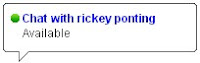
chat with you.The badge will active whenever you sign in to
Googletalk. The nice thing is your visitors can chat with you even
if they don't have a google account.
Yahoo Media Player: With this very useful widget, you can easily add a simple media player to your blog which can auto detect mp3 links and create an embedded player. This tool is very useful for especially audio,music blogs.
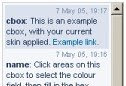
Cbox: Cbox or Chatbox is a chat widget which can be easily embedded
in any web page. It is free and have many features including message
history, spam blocking,etc. It can be easily customizable to fit your
blog layout.
Google Translate: This widget lets your non-English speaking
visitors to quickly translate your webpage in their native
language with just a single click.
Here's a collection of best and most useful blog widgets or add-ons that can be easily integrated with any website/blog. All these below add-ons are 100% Free and they are very easy to install.
Outbrain Star Ratings Widget: Very eager to know what your readers think about your posts?

Here is a cool star rating widget by Outbrain. The insttallation is very simple,
just follow the step by step instructions on their site.
ShareThis or AddThis : Sharethis or Addthis social bookmarking
 buttons makes it easy for your visitors to share your content with others. It is a good way to increase your link popularity and publicity. Their nice css dropdown icons reduces the clutter on your pages and eliminates the need to add a different button for each social bookmarking service.
whos.amung.us : This is a real time visitor tracking widget and displays

the number of people currently on your site and what pages they are
reading. You don't need any sign-up's to grab this widget.
Web2PDF Online : With this widget installed, your visitors can easily download

your articles in PDF format with just a click. The downloaded PDF's are
free of any advertising and you can get full access to download stats,etc.
ZOHO Creator: With Zoho Creator, you can create professional online

contact forms/web forums in minutes. The good things about this is
there are no data limits and readers can also upload attachments while
submitting the form.
Google Talk Badge: Google Talk Badge will let your visitors to

chat with you.The badge will active whenever you sign in to
Googletalk. The nice thing is your visitors can chat with you even
if they don't have a google account.
Yahoo Media Player: With this very useful widget, you can
 easily add a simple media player to your blog which can auto detect mp3 links and create an embedded player. This tool is very useful for especially audio,music blogs.
Cbox: Cbox or Chatbox is a chat widget which can be easily embedded
in any web page. It is free and have many features including message
history, spam blocking,etc. It can be easily customizable to fit your
blog layout.
Google Translate: This widget lets your non-English speaking

visitors to quickly translate your webpage in their native
language with just a single click.
Hello guys.. I'm back again! Sorry for not updating the blog frequently as I'm busy preparing for the exams.. Anyways.. here is my latest Wordpress to Blogger conversion.. "Hot Coffee". The template is 3 columns with two sidebars on the right side. The template suits well for blogs related to foods,drinks,cooking,etc..
Look at the screenshot:

Template Installation:
(Before uploading any new template, backup your current template first)
1. After downloading the template, extract the file using winzip or winrar. Sign in to Blogger and go to Layout » Edit html
and upload the downloaded xml file using the Upload button and Save the Changes.
Editing the Top Navigation Links:
 After installing the template, you can edit the top navigation links to your desired links.. Just search for this code in the template ( Ctrl+F to search)
About
Resources
Contact
and SAVE THE CHANGES.
Look at the screenshot:

Template Installation:
(Before uploading any new template, backup your current template first)
1. After downloading the template, extract the file using winzip or winrar. Sign in to Blogger and go to Layout » Edit html
and upload the downloaded xml file using the Upload button and Save the Changes.
Editing the Top Navigation Links:
 After installing the template, you can edit the top navigation links to your desired links.. Just search for this code in the template ( Ctrl+F to search)
and SAVE THE CHANGES.
How to Show Blogger Links,Widgets in HomePage Only or Post Page Only
Posted by prem | | Category:
|
0
comments
This post explains how to show the Blogger widgets( like links,adsense ads,etc) on your blogspot blog Homepage Only or Post Page Only:
Usually, by default.. when we add a widget item like link units, profile, Archives, Adsense ads,Pictures,etc in Blogger blog , it will be displayed in every page of the blog including the homepage, Permalink pages,etc. As you can see, I installed many widgets in this blog in sidebars like Google ads, Donate Me button ,etc which will be displayed in all the pages of the blog.
But, what if you want to display a specific widget like a blog link,ads in only the homepage and not in the post pages and viceversa? If you want to do so, this tip will come in handy...
HOMEPAGE Only widgets,links in Blogger:
→ As usual, if you want to add a new widget/gadget to your blog, just Sign into Blogger dashboard » Layout » Add a Gadget
and select the type of gadget you need and Save the Changes.
Next, we have to add a small piece of code to that widget, so.. it only displays in the Homepage. Just go to Edit html and tick on the 'Expand Widget Templates'.
Notes: Normally, the widgets in the template view starts with this one
For example, The label widget looks something like this:
and html widget looks like:
and link list looks like this:
(If you want to know exactly what the widget id you need to change, just go to your blog and view the source code and find it.
In Firefox : View » Page Source
In IE : View » Source )
Just below that widget id link, You can see a b:includable tag like this..
At this point, most of the task is completed.. Just we have to add a small piece of code below that b:includable tag..
the code is
Like this:
So, the final code looks similar like the below screenshot:

That's it! and Don't forget to Save the Changes.
Now, your desired widget/gadget can only be visible in Homepage.
Showing in only Post Pages (Permalink pages):
This will allow you to show a specific widget in only the Post Pages and not in the Homepage.
Just follow the same tutorial above but replace this code.
with this one:
Showing Widgets on a Specific Blog Post url:
If you want to dispaly a specific widget on on a particular blog post, just simply follow the above tutorial, but replace this code:
with this one:
Usually, by default.. when we add a widget item
 like link units, profile, Archives, Adsense ads,Pictures,etc in Blogger blog , it will be displayed in every page of the blog including the homepage, Permalink pages,etc. As you can see, I installed many widgets in this blog in sidebars like Google ads, Donate Me button ,etc which will be displayed in all the pages of the blog.
But, what if you want to display a specific widget like a blog link,ads in only the homepage and not in the post pages and viceversa? If you want to do so, this tip will come in handy...
HOMEPAGE Only widgets,links in Blogger:
→ As usual, if you want to add a new widget/gadget to your blog, just Sign into Blogger dashboard » Layout » Add a Gadget
and select the type of gadget you need and Save the Changes.
Next, we have to add a small piece of code to that widget, so.. it only displays in the Homepage. Just go to Edit html and tick on the 'Expand Widget Templates'.
Notes: Normally, the widgets in the template view starts with this one
For example, The label widget looks something like this:
and html widget looks like:
and link list looks like this:
(If you want to know exactly what the widget id you need to change, just go to your blog and view the source code and find it.
In Firefox : View » Page Source
In IE : View » Source )
Just below that widget id link, You can see a b:includable tag like this..
At this point, most of the task is completed.. Just we have to add a small piece of code below that b:includable tag..
the code is
Like this:
So, the final code looks similar like the below screenshot:

That's it! and Don't forget to Save the Changes.
Now, your desired widget/gadget can only be visible in Homepage.
Showing in only Post Pages (Permalink pages):
This will allow you to show a specific widget in only the Post Pages and not in the Homepage.
Just follow the same tutorial above but replace this code.
with this one:
Showing Widgets on a Specific Blog Post url:
If you want to dispaly a specific widget on on a particular blog post, just simply follow the above tutorial, but replace this code:
with this one:
Bringing you all BloggerTricks.com readers another lovely 3 Column Blogger Template "Floral Concept".
Floral Concept was originally a Wordpress theme by Wordpressthemepark.com and I converted this beautiful template to Blogger version.
Look at the screenshot..
The template comes with so many features including 3 columns, embedded comment form below post, Google adsense ready,etc..
Template Installation:
1. First Follow the basic installation steps here.
2.Once, you installed the template, you can change the top navigation links (Home, About,etc)

Just find this code in the template...
Home
About
Pictures
Contact
and replace the links for your interest.
Suppose if you want to link to Google, Yahoo and Blogger.. the code should be..
Google
Yahoo
Blogger
That's it! Now your template is successfully installed!
Floral Concept was originally a Wordpress theme by Wordpressthemepark.com and I converted this beautiful template to Blogger version.
Look at the screenshot..

The template comes with so many features including 3 columns, embedded comment form below post, Google adsense ready,etc..
Template Installation:
1. First Follow the basic installation steps here.
2.Once, you installed the template, you can change the top navigation links (Home, About,etc)

Just find this code in the template...
and replace the links for your interest.
Suppose if you want to link to Google, Yahoo and Blogger.. the code should be..
That's it! Now your template is successfully installed!
Subscribe to:
Posts (Atom)